

Labelr
30-Day Money-Back Guarantee: Not satisfied? Cancel within 30 days for a full refund, no questions asked.
- Visual label designer and print engine: drag-and-drop canvas, text, shapes, tables, images, 13+ barcode types and QR codes
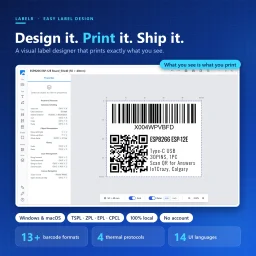
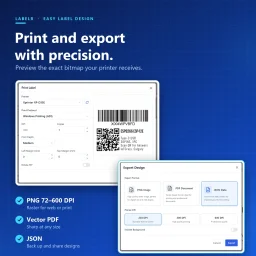
- What you see is what prints: pixel-faithful output at 203, 300 or 600 DPI, with a monochrome bitmap preview
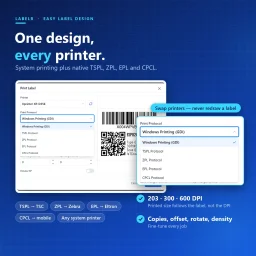
- One design, every printer: any system printer plus native TSPL (TSC), ZPL (Zebra), EPL (Eltron) and CPCL commands
- Thermal-ready images with dithering, path text, layers, 100-step undo, export to PNG, PDF or JSON, 14-language interface
- 100% local, no account or cloud upload; Windows 10+ and macOS 10.15+; user-level install without administrator rights; free trial
Product Details
Overview
Labelr is a modern visual label designer and print engine in one lightweight desktop app for Windows and macOS. Design a label in minutes, then print it to virtually any printer — from an office laser to a Zebra, TSC, Eltron or mobile thermal device. What you see on the canvas is what comes out of the printer.
No servers, no accounts, no waiting for a page to load. Open it, design, print.
The Problems It Solves
- Dated, complicated design tools — hours of training, and only one “label person” who can edit templates
- Printer lock-in — switch printer brands and every template has to be rebuilt
- “Looks fine on screen, prints wrong” — wasted label stock, re-prints and shipments held at the dock
- Poor barcode support — missing formats force workarounds or a second tool
- Cloud-only tools — subscription fees, internet dependency and your product data on someone else’s server
- Windows-only software — Mac users are left out
True WYSIWYG: Pixel-Faithful Printing
The canvas is the single source of truth. When you print, Labelr renders the design at the DPI you choose (203, 300 or 600), flattens it onto an opaque white background and converts it to the printer’s native format — so a transparent logo that turns into a solid black block in other tools comes out clean. Printed size follows the label’s physical dimensions, not the DPI setting, so moving from a 203 DPI to a 300 DPI printer keeps your label exactly the size you designed.
One Design, Every Printer
- Windows GDI / native macOS printing — any printer your operating system can see, from desktop laser and inkjet to label printers
- TSPL — TSC thermal printers
- ZPL — Zebra printers
- EPL — Eltron printers
- CPCL — compact and mobile printers
Templates are independent of the hardware, so you can upgrade or swap printers without redrawing a single label. Fine-tune output with copies, X/Y offset, 90° rotation, print density and left/top margins.
A Design Toolkit for Every Real-World Label
- Text — any installed font, bold, italic, underline, strikethrough, case conversion, letter and line spacing, alignment and wrapping, measured consistently on canvas, in the editor and in print
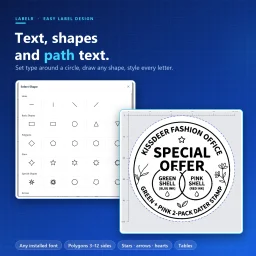
- Path text — set type around a circle or along a wave for badges, seals and product branding
- Shapes — rounded rectangles, circles, ellipses, lines with arrowheads, polygons from 3 to 12 sides, stars, crosses and hearts, with dashed strokes and full fill/stroke control
- Tables — ingredient grids, spec sheets and shipping manifests, with per-cell text styling, adjustable rows and columns and one-click even distribution
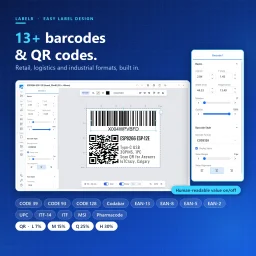
- QR codes — four error-correction levels (L 7%, M 15%, Q 25%, H 30%) for URLs, text and contact details
- Images — import PNG, JPEG, GIF or BMP, then crop, flip and adjust brightness and contrast
13+ Barcode Formats
- Universal — CODE 39, CODE 93, CODE 128, Codabar
- Retail — EAN-13, EAN-8, EAN-5, EAN-2, UPC
- Industrial and logistics — ITF-14, ITF, MSI, Pharmacode
Toggle the human-readable value and adjust its alignment and margins.
Thermal-Ready Images
Labelr ships with a full suite of dithering algorithms (Floyd–Steinberg, Jarvis, Stucki, Atkinson, Burkes, Sierra) and binarization, so photos and logos look crisp on 1-bit thermal output. Use Preview to check the exact monochrome bitmap the printer will receive.
Built for Speed of Work
- Precision controls — exact X/Y position, width, height, 360° rotation and opacity
- Smart alignment — rulers, grids, guides and snap-to-guides
- Layers — drag to reorder, lock, hide, bring to front or send to back
- Multi-select — Shift-click and edit many objects at once
- Real undo/redo — up to 100 steps
- Keyboard-first — Ctrl+A/X/C/V, arrow-key nudging (1 px, or 10 px with Shift) and layer shortcuts
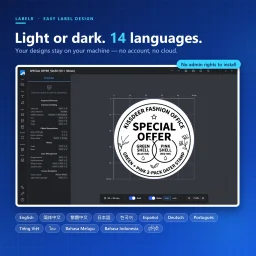
- Light and Dark themes — the label canvas always stays white, so what you see is what you print
A Workflow You Can Learn in Five Minutes
- Set the label — millimeters or inches, rectangle or circle, common size presets or your own size and margins
- Add elements — text, barcodes, QR codes, shapes, images or tables from the toolbar
- Fine-tune — adjust properties and watch the canvas update live
- Preview — see the monochrome bitmap as the printer will
- Print or export — send it to the printer, or export PNG (72–600 DPI), vector PDF or JSON for backup and sharing
Every design is saved locally with an auto-generated thumbnail, and your last label settings are restored when you reopen the app.
14-Language Interface
English, Simplified and Traditional Chinese, Japanese, Korean, Spanish, German, Portuguese, Vietnamese, Thai, Malay, Indonesian, Hindi and more, switchable at runtime — so global teams and multilingual warehouses can work in their own language.
Who It’s For
- Retail and e-commerce — shelf-edge labels, price tags, product stickers and EAN/UPC barcodes, reprinted in seconds when prices change
- Logistics and shipping — shipping labels, parcel IDs, pallet tags and CODE 128 / ITF-14 carton markings for Zebra or TSC thermal printers
- Warehouse and inventory — bin, rack and asset labels with scannable barcodes and QR codes
- Food, pharma and manufacturing — ingredient tables, batch and lot labels, Pharmacode and other regulated barcode formats
- Small business and makers — packaging stickers, circular seals with path text and branded labels on the printer you already own
Your Data Stays Yours
- Local-first — designs live in a local SQLite database in your user profile
- No cloud upload — your products, SKUs and pricing never leave your machine
- No required account — install, open, work
- User-level install — the Windows installer needs no administrator rights, so there are no “access denied” surprises in locked-down environments
Free Trial, License and Requirements
- Free trial — evaluate the full product before you commit; when the trial ends, the app tells you exactly what to do next
- Cryptographically signed licensing — registration uses Ed25519 signature verification, checked in the compiled core
- Windows 10 or later
- macOS 10.15 (Catalina) or later, with a Universal build for Apple Silicon and Intel